
Ever felt like the Spring Framework is just pure magic? You put an @Autowired annotation, and tadaa the object appears 🤌.
But today, we look behind the parda. We are going to build Mini-Spring!
(Spoiler Alert: It’s not magic, purely Jugaad with HashMaps. Don’t tell the interviewers 🤫)
🦁 Why is Spring the King?
Before we start cooking, let’s talk about the ingredient. Spring Framework is the absolute Baahubali of the Java world. 💪
If you use a Banking App, book a flight, or watch a movie on streaming, chances are Spring is running behind the scenes.
- Backbone of Finance: Major banks (J.P. Morgan, Citi, HDFC, etc.) trust it because it is secure like a fortress.
- Enterprise King: It’s like the steel frame of a skyscraper. You could build a building with just bricks (plain Java), but if you want to build the Burj Khalifa, you need a steel frame.
It handles all the heavy lifting—connecting to databases, security, web servers—so developers like you and me can focus on the business logic.
🧐 The Secret Sauce: Inversion of Control (IoC)
Imagine you are making Masala Chai. ☕
- Without Spring (Manual Mode): You grow the tea leaves, milk the cow, light the stove, and boil it all yourself every single time. Itni mehnat nahi karni life me! 😩
- With Spring (Smart Mode): You just sit at the table and say “Bhaiya, ek cutting chai!”, and the Chaiwala (Container) hands it to you.
This Chaiwala is what we call an IoC (Inversion of Control) Container. You don’t worry about how the chai is made; you just get it.
Its like
Me trying to manage dependencies manually: 😵💫
ServiceA a = new ServiceA(new ServiceB(new ServiceC()));Me using Spring: 😎
@Autowired private ServiceA a;-> Rishta Wahi, Soch Nayi
🛠️ The Blueprint: How Mini-Spring Works
Our Mini-Spring is the “Gully Cricket” version of the real Spring. Real Spring is the IPL 🏏; ours is played with a tennis ball. But hey, concepts remain the same!
Here are the players in our team:
1. The Tag (@MyService) 🏷️
First, we need to tell our code, “Me bhi ek player hoon. You can select me for the team.”
In real Spring, this is @Component. In our Mini-Spring, it’s @MyService.
@MyService
public class SmartBulb { ... }
It says : “Main bhi ek player hoon. You can select me for the team.”
2. The Demand (@MyAutowired) 🧲
This is the Arranged Marriage logic. When our container sees this sticker, it knows this class needs a partner to function.
@MyAutowired
private PowerGrid grid;
It says : “Mummy, ladka/ladki dhoond do . I can’t live alone, hehe .”
3. The Head of Family (MiniSpring Container) 👴
This is the Bauji (Big Boss). He does three main jobs:
- Scan: Searches your package for anyone wearing the
@MyServicebadge. 🕵️ - Register: Keeps a note of everyone in his khata.
- Inject: Connects the families (objects) using Reflection. Rishta pakka! 🤝
🧬 Singleton vs. Prototype
Our Mini-Spring understands two types of lifestyles :
Singleton (Default) 🧘♂️
- Concept: I dont need to explain this. I mean look at your life :p.
- In Code:
@MyService // Default is "singleton"
public class PowerGrid { ... }
Prototype 🐑
- Concept: Sabko apna milega.
- In Code:
@MyService(scope = "prototype") // New one every time
public class SmartBulb { ... }
🧪 The “Tadka” (Code Snippet)
Here is the recursive logic for building the dependencies.
// Inside MiniSpring.java
private void injectDependencies(Object bean) {
    for (Field field : bean.getClass().getDeclaredFields()) {
        if (field.isAnnotationPresent(MyAutowired.class)) {
            // "Arre dependency mil gayi!" 😲

            // 1. Find the matching dependency
            Object dependency = getBean(field.getType());

            // 2. Make sure reflection is allowed to access the field
            field.setAccessible(true);

            // 3. Set the dependency!
            field.set(bean, dependency);
        }
    }
}
🎬 The Full Picture
Let’s walk through the execution flow.
1. The Opening Ceremony 🕯️
It all starts in Main.java. We create an instance of our container.
MiniSpring context = new MiniSpring();
context.start("org.learn.service"); // Looks for all classes within this package
2. The Door-to-Door Survey (Scanning) 📝
The start() method calls getPackagePathFiles().
It converts the package name
org.learn.serviceto a file path.It knocks on every file in that directory.
“Hello, are you a
@MyService?”If YES, it creates a
BeanDefinition(a profile card) for that class and saves it in a Map.// Scanning Logic (Simplified) File[] files = directory.listFiles(); for (File file : files) { Class<?> clazz = Class.forName(package + "." + fileName); if (clazz.isAnnotationPresent(MyService.class)) { BeanDefinition def = new BeanDefinition(); def.setBeanClass(clazz); definitions.put(clazz, def); } }
3. The Grand Assembly (Instantiation) 🏗️
Once the scanning is done, MiniSpring looks at its list of definitions.
For every Singleton bean, it says: “Main abhi banaunga!” (I’ll make it now).
It calls
getBean(Class).// Pre-instantiating Singletons for (Class<?> clazz : definitions.keySet()) { if (isSingleton(clazz)) { getBean(clazz); } }
4. The Relationship Management (Injection) 💍
Inside getBean(), the real drama happens:
- Create Object:
new SmartBulb(). - Inject Dependencies: It sees
@MyAutowiredonPowerGrid grid. - Recursive Call: It calls
getBean(PowerGrid.class). - Set Field: Once it gets the
PowerGridobject, it forcibly pushes it into the private field ofSmartBulb.
5. Happy Ending 🎉
Back in Main.java, when you ask for:
LivingRoom room = context.getBean(LivingRoom.class);
room.turnOnLights();
All dependencies are already resolved. The lights turn on.
Output
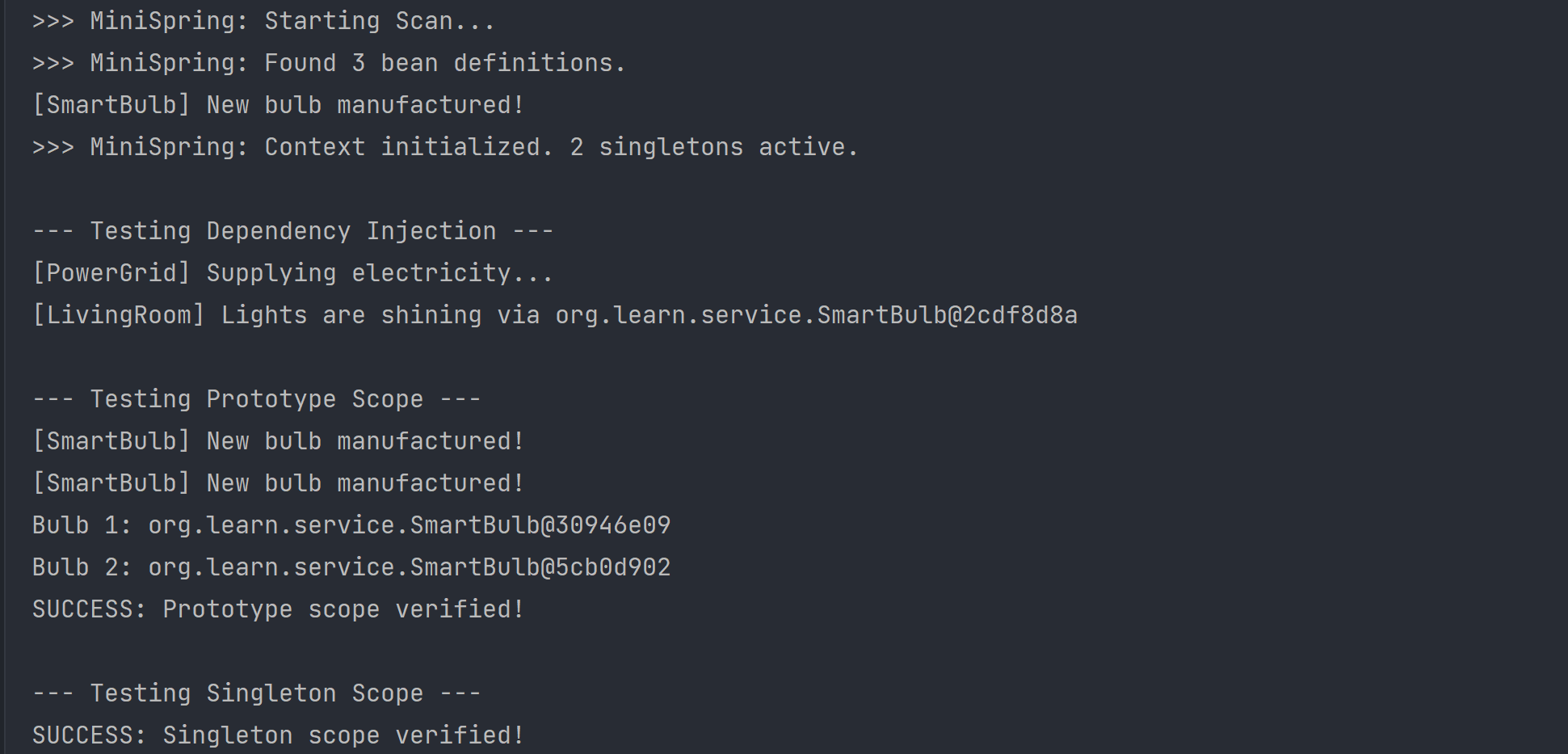
📝 Decoding the Output:
- “Starting Scan…”: The container wakes up and starts looking for files.
- “Found X bean definitions”: It found our
@MyServiceclasses (LivingRoom,SmartBulb,PowerGrid). - “Context initialized”: All Singletons are ready to serve.
- "[LivingRoom] Lights are shining…": This proves that
LivingRoomsuccessfully gotSmartBulbandPowerGridinjected into it! 💡 - Prototype Test: You can see
Bulb 1andBulb 2have different memory addresses (e.g.,@6acbcfc0vs@5f184fc6). This means they are different objects. - Singleton Test:
PowerGridhas the same address both times. It’s the same object.
⚠️ Disclaimer: Picture Abhi Baaki Hai
While our Mini-Spring runs, comparing it to the actual Spring Framework is like comparing your home-made Maggie to a 5-Course Meal at Taj. 🍝 vs 🍲
Real Spring handles:
- Circular dependencies.
- AOP Proxies (The middle-men/dalals)
- Web servers
- And 100 other things.